
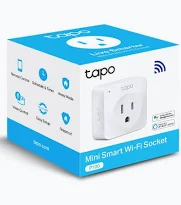
TP-Link Mini Smart Wi-Fi Socket – TL-TAPO P100 (1-PACK)
KSh 1,799.00
- Remote appliance control through the Tapo app
- Automatic schedules and countdown timers
- Voice control through supported assistants
- Away Mode for scheduled lighting activity
- Compact design with no separate hub required
Tapo P100 Smart Socket – TP-Link Mini Smart Wi-Fi Socket (1-Pack)
Make everyday appliances easier to manage with the Tapo P100 Smart Socket, a compact smart plug designed to bring convenient wireless control to your home or office. Connect compatible appliances and control their power through the Tapo mobile app, set automatic schedules, or use supported voice assistants. Its space-saving design, timer functions, and Away Mode make it a practical addition to a modern smart home.
The TP-Link Tapo P100 Mini Smart Wi-Fi Socket (1-Pack) connects to your existing 2.4GHz Wi-Fi network without requiring a separate smart home hub. It helps you manage compatible lamps, fans, and other electrical devices with greater convenience.
What Is the TP-Link Tapo P100 Smart Socket?
The TP-Link Tapo P100 is a smart electrical socket that lets you remotely switch compatible connected appliances on or off. After connecting it to your Wi-Fi network and configuring it through the Tapo app, you can manage your devices using your smartphone.
Unlike a traditional plug, this smart socket supports scheduled operation, countdown timers, and Away Mode. These features make everyday appliance management simpler, whether you are at home, at work, or travelling.
Learn more on the official TP-Link Tapo P100 product page.
Technical Specifications
- Brand: TP-Link
- Product Model: Tapo P100
- Product Type: Mini Smart Wi-Fi Socket
- Pack Size: 1 socket
- Wireless Connectivity: 2.4GHz Wi-Fi, IEEE 802.11b/g/n
- Bluetooth: Bluetooth 4.2 for initial setup on documented versions
- App Control: TP-Link Tapo app
- Voice Control: Amazon Alexa and Google Assistant, where supported
- Smart Features: Remote control, scheduling, countdown timer, and Away Mode
- Controls: Physical power button and status LED
- Material: Polycarbonate housing; flame-retardant material on documented versions
- Power Rating: Depends on the regional hardware version; UK versions may support up to 13A
- Installation: Plug-in setup without a separate smart hub
- Package Contents: Tapo P100 smart socket and quick start guide
Electrical ratings, plug type, dimensions, and certifications vary by region and hardware revision. Confirm the exact version supplied before connecting appliances.
Why Choose the TP-Link Tapo P100 Smart Socket?
Control Appliances Remotely
Manage compatible connected devices through the Tapo app on your smartphone. Switch a lamp or another suitable appliance on or off without needing to reach its physical switch.
Remote control is particularly useful when you are away from home or want to manage appliances from another room. Your phone and socket require the appropriate network and app configuration for remote access.
Create Automatic Schedules
Set schedules to operate compatible appliances at selected times. For example, schedule a lamp to switch on in the evening or turn off a connected device at bedtime.
Automated schedules help establish consistent routines and reduce the need for manual switching. You can adjust your settings through the app whenever your daily schedule changes.
Use Convenient Countdown Timers
The countdown timer lets you specify when a connected appliance should switch off or complete a timed power-control action. This is useful for devices that do not need to remain powered indefinitely.
For example, you can set a compatible lamp to turn off after a chosen period. Always ensure the connected appliance is suitable for unattended operation.
Support Voice Control
The socket works with supported Amazon Alexa and Google Assistant configurations. Once linked to a compatible voice assistant, you can use voice commands to control connected appliances.
This feature can make everyday tasks more convenient when your hands are occupied or your phone is not nearby. Availability depends on the assistant, account configuration, region, and supported device integration.
Activate Away Mode
Away Mode can switch a connected appliance on and off at varying times to create the appearance of activity at home. It is particularly useful for controlling a compatible lamp while you are travelling.
This feature may help make a home appear occupied, but it is not a substitute for a dedicated security system.
Enjoy a Compact, Hub-Free Setup
The mini design helps reduce clutter around wall sockets. Its direct Wi-Fi connection means you do not need to purchase a separate smart home hub for basic setup and control.
The physical power button also allows convenient manual switching when required. A status LED helps indicate the socket’s operating or connection status.
Practical Uses for the TP-Link Tapo P100
Smart Home Lighting
Control compatible table lamps and other suitable lighting devices remotely. Create schedules for morning or evening routines and use Away Mode when travelling.
Home Office Convenience
Manage compatible desk lamps and other suitable appliances through the app. Timers and schedules can help organise your workspace and everyday routines.
Everyday Appliance Management
Use the socket with compatible small appliances that remain within its rated electrical limits. Check each appliance’s power requirements before connecting it, particularly when it has a motor or heating element.
Travel and Home Routines
Set lighting schedules before leaving home and remotely control compatible connected devices when network access is available. These functions offer convenience without requiring a complex smart home installation.
Compatibility, Installation and Safety
Download the Tapo app, plug the socket into a compatible wall outlet, and follow the in-app setup instructions. The documented P100 versions use 2.4GHz Wi-Fi, so confirm that your router provides a compatible network.
Check the socket’s regional plug format and maximum electrical rating before use. The product is intended for indoor environments and should not be used outdoors or in damp conditions. Do not exceed the rated load, and avoid connecting appliances that require more current than the socket supports.
For setup guides and model-specific documentation, visit the official TP-Link Tapo P100 support page.
Why Buy the TP-Link Tapo P100 at Avidikventures?
Avidikventures offers practical technology accessories for homes, offices, and everyday digital lifestyles. This smart socket provides convenient app-based control, flexible scheduling, and voice assistant support in a compact design.
Make everyday appliance control simpler with the TP-Link Tapo P100 Mini Smart Wi-Fi Socket. Visit Avidikventures to explore this smart home accessory and other connectivity solutions.











Reviews
There are no reviews yet.