
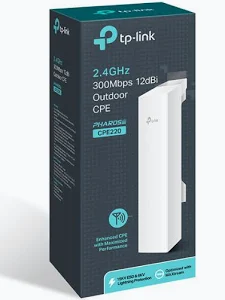
TP-Link 2.4GHz 300Mbps 12dBi Outdoor CPE – TL-CPE220
KSh 5,500.00
- 2.4 GHz wireless connectivity up to 300 Mbps
- Built-in 12 dBi directional MIMO antenna
- Multiple wireless operating modes
- Outdoor enclosure with IPX5 water protection on documented versions
- Passive PoE and Pharos management support
TP-Link CPE220 Outdoor CPE – 2.4GHz 300Mbps 12dBi
The TP-Link CPE220 Outdoor CPE is a long-range wireless networking solution designed for outdoor connectivity, building-to-building links, and point-to-multipoint deployments. It combines 2.4 GHz wireless performance, a built-in 12 dBi directional antenna, and outdoor-ready construction. This makes it suitable for businesses, farms, schools, warehouses, and properties that need to connect network locations across open spaces.
With wireless speeds of up to 300 Mbps, the TP-Link CPE220 helps extend network connectivity beyond the reach of conventional indoor routers. Its directional antenna focuses wireless energy toward a selected area, making correct alignment important for link performance. Explore the official TP-Link CPE220 product page for manufacturer details.
What Is the TP-Link CPE220 Outdoor CPE?
The TP-Link CPE220 is an outdoor customer-premises equipment device designed for wireless networking over longer distances. It operates on the 2.4 GHz band and uses IEEE 802.11b/g/n wireless technology. Its built-in 12 dBi dual-polarised directional MIMO antenna helps establish focused wireless links between suitable locations.
The CPE220 supports several operating modes, including Access Point, Client, Bridge, Repeater, AP Router, and AP Client Router, depending on the hardware and firmware version. This flexibility allows network administrators to configure it for different wireless deployment needs.
It also supports TP-Link Pharos MAXtream technology, which uses time-division multiple access to help improve performance in compatible point-to-multipoint networks. The weather-resistant enclosure is designed for outdoor installation, while passive Power over Ethernet simplifies power delivery through a network cable.
Technical Specifications of the TP-Link CPE220 Outdoor CPE
- Brand: TP-Link
- Product family: Pharos
- Model: CPE220
- Product type: Outdoor wireless CPE
- Wireless standard: IEEE 802.11b/g/n
- Frequency band: 2.4 GHz
- Maximum theoretical wireless speed: Up to 300 Mbps
- Built-in antenna: 12 dBi dual-polarised directional MIMO antenna
- Antenna beamwidth: Approximately 60° horizontal and 30° vertical
- Ethernet interfaces: 2 × 10/100 Mbps shielded Ethernet ports on supported versions
- Power input: Passive PoE, approximately 16–27 V DC on documented versions
- Maximum power consumption: Approximately 10.8 W
- Wireless modes: AP, Client, Bridge, Repeater, AP Router, and AP Client Router, depending on revision
- Management: PharOS web interface and Pharos Control software
- Outdoor protection: IPX5-rated water protection on documented versions
- Surge protection: 15 kV ESD and 6 kV lightning protection on documented versions
- Dimensions: Approximately 276 × 79 × 60 mm
Hardware revisions may differ in port configuration, operating modes, and included accessories. Confirm the specifications for your exact version using the official TP-Link CPE220 datasheet and documentation.
Why Choose the TP-Link CPE220 Outdoor CPE?
Directional 12 dBi Antenna for Long-Range Links
The integrated 12 dBi directional antenna focuses wireless signals toward a target area instead of distributing them equally in every direction. This design is useful for connecting buildings, remote workspaces, or network locations with a suitable line of sight.
TP-Link describes the CPE220 as suitable for long-range transmission exceeding 13 km under appropriate conditions. This is a theoretical deployment capability, not a guaranteed operating distance. Interference, terrain, antenna alignment, local regulations, and environmental conditions affect actual results.
Reliable 2.4 GHz Wireless Connectivity
The 2.4 GHz band supports compatible Wi-Fi devices and can be useful for outdoor links where suitable coverage and signal propagation matter. Its theoretical wireless rate reaches up to 300 Mbps under supported settings.
Actual throughput is lower than the advertised wireless rate and depends on link quality, channel width, interference, and the receiving device. For the best results, plan the channel and installation around the surrounding wireless environment.
Flexible Networking Modes
The CPE220 supports multiple operating modes for different deployment scenarios. Configure it as an access point to provide wireless connectivity, or use a compatible client or bridge mode to connect a remote network.
Point-to-point and point-to-multipoint installations can help connect separate buildings or distribute connectivity across a property. The appropriate configuration depends on the network layout and the devices at each endpoint.
Outdoor-Ready Construction
The enclosure is designed for outdoor installation and offers IPX5 water protection on documented versions. Built-in ESD and lightning protection features help protect the device against specified electrical events.
Correct grounding, secure mounting, and suitable cable protection remain important for outdoor reliability. Follow the manufacturer’s installation instructions, especially when mounting the unit on a pole or exposed building surface.
Passive PoE and Centralised Management
Passive Power over Ethernet supplies power through the Ethernet cable, reducing the need for a nearby electrical outlet. The included adapter and supported voltage depend on the product package and hardware revision. Use only a compatible power source.
The PharOS management interface provides configuration tools, while Pharos Control supports centralised monitoring and maintenance for compatible deployments. Visit the official Pharos product resources to learn more.
Where Can You Use the TP-Link CPE220?
Building-to-building connectivity: Establish a wireless link between offices, workshops, warehouses, or separate buildings where a suitable line of sight exists.
Farms and rural properties: Connect selected buildings, equipment areas, or remote workspaces to a central network.
Schools and campuses: Link separate facilities or provide wireless connectivity across suitable outdoor areas.
Warehouses and industrial sites: Extend network connectivity between operational buildings and outdoor work zones.
Internet service deployments: Use supported access point and client configurations for point-to-multipoint wireless distribution.
Large residential compounds: Connect a main building to a detached office, workshop, or other remote location.
Installation and Compatibility
Mount the CPE220 securely and aim its directional antenna toward the receiving device. For a point-to-point link, configure compatible devices at both ends and ensure suitable alignment. Connect the Ethernet cable to the appropriate passive PoE port and use the specified power adapter.
For outdoor deployments, provide proper grounding and protect exposed cable connections. Confirm the hardware revision before choosing accessories, and check local wireless transmission regulations. Review the TP-Link CPE220 support page for manuals, firmware, and setup resources.
Why Buy the TP-Link CPE220 at Avidik Ventures?
Avidik Ventures helps customers source networking equipment for business, educational, agricultural, and residential projects. The CPE220 is a practical option for directional outdoor wireless links and selected point-to-multipoint deployments.
Choose equipment that matches your distance, line-of-sight, and network requirements. Contact Avidik Ventures through avidikventures.co.ke for product enquiries and assistance with your wireless networking project.











Reviews
There are no reviews yet.