
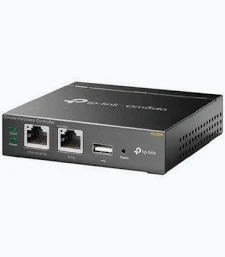
TP-Link Omada Hardware Controller – TL-OC200
KSh 10,499.00
- Centralized management of compatible Omada devices
- Remote cloud access and local management
- Automatic device discovery and network monitoring
- Batch configuration and firmware management
- PoE or Micro USB power options
TP-Link Omada OC200 Controller – Omada Hardware Network Controller
The TP-Link Omada OC200 Controller is a dedicated hardware controller designed to simplify network management for businesses, offices, hotels, schools, and other professional environments. It centralizes the monitoring and configuration of compatible Omada access points, switches, and routers through one management interface. With remote cloud access, automated device discovery, and centralized configuration tools, it helps network administrators manage their infrastructure more efficiently.
What It Is: TP-Link Omada OC200 Controller
The OC200 is a compact hardware controller built for the TP-Link Omada Software Defined Networking (SDN) platform. It provides centralized management without requiring a dedicated computer or server to run the controller software continuously.
Once connected to a compatible network, it helps administrators discover supported devices, configure network settings, monitor traffic, and manage multiple locations. The Omada app and web interface provide convenient access to supported management functions.
Cloud access allows authorized administrators to monitor and manage their network remotely. Local management is also available for environments that prefer on-premises administration.
Explore the official TP-Link OC200 product page for details about the latest hardware version.
Technical Specifications: TP-Link Omada OC200 Controller
- Brand: TP-Link
- Product family: Omada SDN
- Model: OC200
- Product type: Hardware network controller
- Management platform: TP-Link Omada SDN
- Ethernet interfaces: 2× Ethernet ports; Gigabit on V3, with Fast Ethernet on earlier revisions
- USB interface: 1× USB 2.0 port for supported backup functions
- Power input: 802.3af/at PoE or Micro USB, 5 V DC, minimum 1 A
- Dimensions: Approximately 100 × 98 × 25 mm
- Cloud management: Supported
- Local management: Supported
- Mobile management: Omada app
- Management features: Device discovery, centralized configuration, network monitoring, alerts, and batch firmware upgrades
- Advanced capabilities: Multi-site management, captive portal configuration, network topology, and reporting tools, depending on controller version
- Installation: Desktop or wall mounting, depending on installation requirements
Hardware specifications and supported device capacity differ by revision. The V3 model is recommended for managing 25 Omada devices for a consistently responsive experience. Earlier versions support larger stated device limits under their respective specifications.
Refer to the official OC200 datasheet and confirm the hardware revision before purchasing.
Why Choose TP-Link Omada OC200 Controller?
Centralize Network Management
Manage compatible Omada access points, switches, and routers from one interface. Centralized administration reduces the need to configure each device individually and helps maintain consistent network settings.
This approach is useful for organizations with multiple wireless access points or network switches. Administrators can monitor connected equipment and manage supported configurations more conveniently.
Access Your Network Remotely
Cloud access allows authorized users to manage supported network settings through the Omada app or web interface. This can be helpful for IT teams responsible for networks across offices, hospitality properties, or other locations.
Local management is also available for administrators who prefer to work directly within the network. Cloud features and remote access require suitable connectivity and configuration.
Simplify Network Maintenance
Device discovery, batch configuration, and firmware management tools help streamline routine administration. Network topology views provide a visual overview of supported connections, helping administrators investigate connectivity problems.
Monitoring dashboards also help track network activity and identify potential issues. Available reports and alerts depend on the controller hardware version and software capabilities.
Operate Without a Dedicated Server
The hardware controller runs the Omada management system on a dedicated device. This removes the need to keep a separate PC or server running solely for controller operation.
Its compact enclosure and PoE power option can simplify installation near network equipment. A compatible PoE switch or injector can supply power, while supported Micro USB power provides an alternative.
Product Use Cases: TP-Link Omada OC200 Controller
Business Offices
Centralize management of compatible wireless access points and switches across office workspaces. IT administrators can standardize supported settings, monitor network status, and simplify routine maintenance.
Hotels and Hospitality
Manage compatible Omada wireless infrastructure across guest rooms, reception areas, meeting spaces, and other locations. Supported captive portal features can help configure guest Wi-Fi authentication.
Schools and Training Facilities
Coordinate compatible wireless access points across classrooms, offices, libraries, and shared spaces. Centralized configuration can make ongoing network maintenance easier for IT teams.
Multi-Site Businesses
Use supported multi-site management features to administer compatible Omada networks across different locations. This is useful for organizations that need a consistent management approach across branches.
Why Buy at Avidikventures?
Avidikventures helps businesses find networking equipment for reliable, manageable IT infrastructure. The OC200 provides a dedicated management solution for compatible Omada networks, helping simplify administration and network monitoring.
Before purchasing, confirm hardware revision, supported device compatibility, and management capacity for your deployment. Visit Avidikventures to explore networking equipment for your business.












Reviews
There are no reviews yet.