
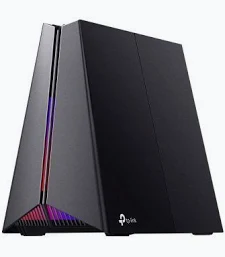
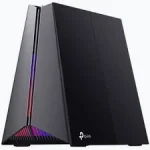
TP-Link GE550 | BE9300 Tri-Band Wi-Fi 7 Gaming Router – TL-ARCHER GE550
KSh 34,999.00
- BE9300 tri-band Wi-Fi 7
- Up to 9,328 Mbps combined theoretical wireless speed
- Five 2.5 Gigabit Ethernet ports
- Six internal antennas with beamforming
- EasyMesh compatibility and Multi-Link Operation
TP-Link Archer BE550 Router – BE9300 Tri-Band Wi-Fi 7 Router
Upgrade your home or office network with the TP-Link Archer BE550 Router, a BE9300 tri-band Wi-Fi 7 solution built for high-speed wireless connectivity and multi-gigabit networking. It supports demanding activities such as 8K streaming, online gaming, video conferencing, and large file transfers. With three wireless bands, Multi-Link Operation (MLO), and five 2.5 Gigabit Ethernet ports, it offers flexibility for modern connected environments.
What It Is: TP-Link Archer BE550 Router
The Archer BE550 is a Wi-Fi 7 router designed to manage multiple connected devices across three frequency bands. Its combined theoretical wireless speed reaches up to 9,328 Mbps on specifications that list 688 Mbps on 2.4 GHz, 2,880 Mbps on 5 GHz, and 5,760 Mbps on 6 GHz.
The separate bands allow compatible devices to use suitable wireless resources for different activities. The 6 GHz band offers additional capacity for supported devices, while 2.4 GHz supports many everyday connected devices. Actual performance depends on device compatibility, interference, distance, and your internet service.
Wi-Fi 7 technologies include MLO, 320 MHz channel support, 4K-QAM, and Multi-RUs. These features can improve throughput and wireless efficiency when supported by the client device and network conditions.
Explore the official TP-Link Archer BE550 product page for regional product details.
Technical Specifications: TP-Link Archer BE550 Router
- Brand: TP-Link
- Model: Archer BE550
- Wireless standard: Wi-Fi 7 (IEEE 802.11be)
- Wireless classification: BE9300 tri-band
- 2.4 GHz speed: Up to 688 Mbps on applicable regional specifications
- 5 GHz speed: Up to 2,880 Mbps
- 6 GHz speed: Up to 5,760 Mbps
- Antennas: Six internal antennas
- Wireless technologies: MLO, 320 MHz channels, 4K-QAM, Multi-RUs, OFDMA, and beamforming
- MU-MIMO: 2×2 MU-MIMO
- Ethernet ports: 1× 2.5 Gbps WAN and 4× 2.5 Gbps LAN
- USB: 1× USB 3.0 port
- Operating modes: Router mode and access point mode
- Mesh compatibility: EasyMesh-compatible
- Security: HomeShield security features and supported WPA security options
- Management: TP-Link Tether app and web interface
- VPN: Supported VPN client and server functions
Specifications may vary by region and hardware revision. Check the official TP-Link support page for the correct manual, firmware, and datasheet.
Why Choose TP-Link Archer BE550 Router?
Enjoy Fast Tri-Band Wi-Fi 7 Connectivity
Wi-Fi 7 introduces technologies designed to increase throughput and make better use of available wireless resources. The three-band design helps distribute compatible devices across 2.4 GHz, 5 GHz, and 6 GHz connections.
MLO allows supported devices to use multiple links under compatible configurations. This can improve throughput, reduce latency, and support more responsive network performance. Results depend on client support and local wireless conditions.
Connect Through Multi-Gigabit Ethernet
The router includes one 2.5 Gbps WAN port and four 2.5 Gbps LAN ports. These connections support compatible internet services, computers, network storage devices, and other multi-gigabit equipment.
Compared with standard Gigabit Ethernet, 2.5 Gbps ports provide greater wired link capacity. Your actual transfer speeds still depend on the connected equipment, network configuration, and internet plan.
Expand Coverage with Beamforming
Six internal antennas and beamforming help direct wireless signals toward connected devices. TP-Link’s wireless optimisation features are designed to improve coverage across suitable home and office environments.
Coverage varies with building materials, interference, router placement, and connected devices. For larger spaces, EasyMesh compatibility allows supported routers and range extenders to work together as an expanded network.
Manage Security and Network Settings
The Tether app and web interface provide tools for configuring and managing the network. HomeShield offers supported security features, including network protection and parental controls, depending on region and service availability.
VPN client and server functions can support selected secure networking configurations. Consult the manufacturer’s documentation to confirm supported protocols and setup requirements.
Product Use Cases: TP-Link Archer BE550 Router
High-Quality Streaming and Entertainment
Connect compatible televisions, streaming devices, laptops, and phones for demanding entertainment applications. The available wireless capacity can support high-resolution streaming when the internet connection and devices meet the requirements.
Gaming and Low-Latency Applications
Connect gaming PCs and consoles through Wi-Fi or multi-gigabit Ethernet. Compatible Wi-Fi 7 devices can benefit from newer wireless technologies, while wired connections can help reduce interference-related instability.
Home Offices and Small Businesses
Support video meetings, cloud applications, file sharing, and multiple connected workstations. The router’s tri-band wireless design and four multi-gigabit LAN ports make it suitable for demanding home offices and small business environments.
Network Storage and Large File Transfers
Connect compatible network-attached storage devices, desktop computers, and workstations through the 2.5 Gbps LAN ports. This setup can benefit users transferring large files across a suitably equipped local network.
Why Buy TP-Link Archer BE550 Router at Avidikventures?
Avidikventures helps customers find networking equipment for modern homes, offices, and business environments. This Wi-Fi 7 router combines advanced wireless features, multi-gigabit wired connectivity, and convenient network management in one device.
Choose a router that matches your internet plan, coverage needs, and connected equipment. Visit Avidikventures for networking solutions and assistance with selecting compatible products.
Upgrade your network with the TP-Link Archer BE550 and prepare for demanding wireless and wired applications. Check regional specifications and device compatibility to ensure it meets your requirements.











Reviews
There are no reviews yet.