
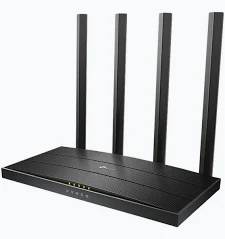
TP-Link AC1900 Wireless MU-MIMO Gigabit Dual-Band Wi-Fi 5 Router – TL-ARCHER C80
KSh 5,300.00
- AC1900 dual-band Wi-Fi 5
- Up to 1300 Mbps on 5 GHz and 600 Mbps on 2.4 GHz
- Four external antennas with Beamforming
- MU-MIMO and Airtime Fairness
- One Gigabit WAN port and four Gigabit LAN ports
TP-Link Archer C80 AC1900 Wireless Router – Gigabit Dual-Band Wi-Fi 5 Router
Upgrade your home or office network with the TP-Link Archer C80 AC1900 wireless router, designed for fast wireless connectivity, multiple connected devices, and demanding everyday internet use. It delivers combined dual-band Wi-Fi speeds of up to 1900 Mbps, with 1300 Mbps on 5 GHz and 600 Mbps on 2.4 GHz. Four external antennas, MU-MIMO technology, and Beamforming help improve wireless coverage and network efficiency.
What It Is
The TP-Link Archer C80 is a dual-band Wi-Fi 5 router built for homes, home offices, and small businesses. It uses IEEE 802.11ac Wave 2 technology on the 5 GHz band and IEEE 802.11n technology on the 2.4 GHz band.
The two wireless bands help accommodate different network activities. The 5 GHz band supports higher wireless link rates for compatible devices, while 2.4 GHz provides another connection option for everyday browsing and devices farther from the router.
The Archer C80 includes one Gigabit WAN port and four Gigabit LAN ports. This allows compatible wired devices to connect at up to 1000 Mbps, subject to network conditions. For official details, visit the TP-Link Archer C80 product page.
TP-Link Archer C80 AC1900 Wireless Router Specifications
The following specifications reflect TP-Link’s published documentation. Features can vary by region and hardware revision.
- Brand: TP-Link
- Model: Archer C80
- Product Type: AC1900 Dual-Band Wi-Fi 5 Router
- Wi-Fi Standard: IEEE 802.11ac/n/a on 5 GHz; IEEE 802.11n/b/g on 2.4 GHz
- Maximum Wireless Speed: 1300 Mbps on 5 GHz and 600 Mbps on 2.4 GHz
- Frequency Bands: 2.4 GHz and 5 GHz
- Antennas: 4 fixed external antennas
- Wireless Technologies: 3×3 MIMO, MU-MIMO, Beamforming, and Airtime Fairness
- WAN Port: 1 × Gigabit Ethernet
- LAN Ports: 4 × Gigabit Ethernet
- Operating Modes: Router and Access Point
- Network Features: Smart Connect, QoS, guest network, parental controls, and IPv4/IPv6
- Security Features: SPI firewall, access controls, and supported WPA/WPA2 encryption; WPA3 availability depends on hardware and firmware
- Mesh Compatibility: OneMesh or EasyMesh support depends on hardware revision and firmware
- Power Supply: 12V DC; adapter rating varies by region
- Dimensions: Approximately 215 × 117 × 32 mm
- Management: Web interface and TP-Link Tether app
The AC1900 rating represents combined theoretical wireless link rates, not guaranteed internet throughput. Actual performance depends on connected devices, interference, router placement, and your internet plan. See the official Archer C80 datasheet for more information.
Why Choose the TP-Link Archer C80 AC1900 Wireless Router
High-Speed Dual-Band Wi-Fi 5
The Archer C80 delivers wireless link rates of up to 1300 Mbps on 5 GHz and 600 Mbps on 2.4 GHz. This dual-band design helps distribute network activities across two frequencies, depending on device compatibility and signal conditions.
The 5 GHz band suits compatible devices used for high-definition streaming, large downloads, and online gaming. The 2.4 GHz band provides another option for general browsing and devices that benefit from its coverage characteristics.
Four External Antennas and Beamforming
Four fixed external antennas help distribute the wireless signal around your home or workspace. Beamforming detects connected devices and focuses wireless transmission toward them, helping improve signal efficiency where supported.
For better results, position the router in an open, central location away from major obstructions. Actual coverage depends on building materials, interference, and the wireless capabilities of connected devices.
MU-MIMO for Multiple Connected Devices
MU-MIMO technology helps the router communicate with multiple compatible devices more efficiently. Its 3×3 MIMO design supports three spatial streams, which can benefit compatible client devices.
This is useful in homes and offices where several people use Wi-Fi for browsing, video calls, streaming, and other activities. MU-MIMO benefits depend on client-device support and network conditions.
Gigabit Ethernet for Wired Connections
The Archer C80 features one Gigabit WAN port and four Gigabit LAN ports. Connect compatible desktop computers, smart TVs, gaming consoles, network storage devices, or other Ethernet equipment for a wired connection.
Gigabit Ethernet supports higher wired link rates than Fast Ethernet ports. Actual internet speeds still depend on your service plan, cabling, connected equipment, and network configuration.
Smart Connect and Airtime Fairness
Smart Connect can help direct compatible devices to the more suitable wireless band based on network conditions. Airtime Fairness helps manage how wireless transmission time is shared between connected devices.
Together, these features can help make better use of available wireless capacity when several devices are active. Their effectiveness depends on the client devices and surrounding wireless environment.
Guest Network and Parental Controls
Guest network support lets visitors access the internet without using your main Wi-Fi credentials. Separate guest networks are available for supported frequency bands.
Parental controls provide options such as website filtering and time controls. These features help households manage access for supported devices and organise internet use.
For setup guidance and revision-specific downloads, visit the official TP-Link Archer C80 support page.
TP-Link Archer C80 AC1900 Wireless Router Use Cases
Home Entertainment and Streaming
Connect smart TVs, laptops, smartphones, and tablets for streaming, browsing, and everyday internet use. Dual-band Wi-Fi helps compatible devices select a suitable band for their needs.
Gaming and Home Offices
Use the 5 GHz band for compatible gaming systems and work devices that need higher wireless link rates. For latency-sensitive applications, a wired Gigabit connection may provide more consistent performance.
Small Businesses and Shared Networks
Provide Wi-Fi for staff, visitors, and compatible business devices. Guest networking and access controls help organise access, while Gigabit ports support wired equipment.
Expanding Whole-Home Wi-Fi
Compatible mesh or range-extender products can help improve coverage in areas with weak signals. Check the Archer C80’s hardware revision and firmware to confirm supported OneMesh or EasyMesh features before planning an expansion.
Why Buy TP-Link Archer C80 AC1900 Wireless Router at Avidikventures
Avidikventures helps customers source networking products for homes, offices, and small businesses. Before ordering, consider your internet package speed, coverage requirements, number of connected devices, and need for Gigabit Ethernet.
Choose the TP-Link Archer C80 for AC1900 dual-band Wi-Fi, four external antennas, MU-MIMO, and full Gigabit Ethernet ports. Visit Avidik Ventures to explore networking products or enquire about availability.











Reviews
There are no reviews yet.