
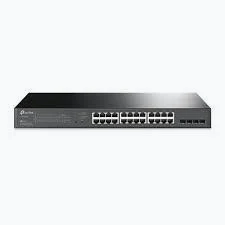
TP-Link 28-Port 10/100/1000Mbps JetStream Gigabit Smart Switch with 24-Port PoE+ (250W) & 4× Gigabit SFP Slots- TL-SG2428P
KSh 34,999.00
- 24 Gigabit PoE+ ports
- 250W total PoE power budget
- Four Gigabit SFP slots
- Smart management with VLAN, QoS, ACL, and static routing
- 1U rackmount design
TP-Link TL-SG2428P JetStream Switch – 24-Port Gigabit PoE+ Managed Switch
Expand your business network with the TP-Link TL-SG2428P JetStream switch, a Gigabit smart switch designed for offices, surveillance systems, schools, retail spaces, and growing businesses. It features 24 Gigabit PoE+ ports and four Gigabit SFP slots for flexible network connections. With a total PoE power budget of 250W, it can power compatible devices while transferring data over Ethernet.
What It Is
The TP-Link TL-SG2428P is a 28-port JetStream Gigabit Smart Switch built for reliable wired connectivity and centralised network management. Its 24 RJ45 ports support Gigabit Ethernet and PoE+, while four dedicated Gigabit SFP slots provide fibre uplink options.
Power over Ethernet simplifies installations by carrying both data and electrical power over a single Ethernet cable to compatible devices. This is particularly useful for IP cameras, wireless access points, and VoIP phones installed across offices or commercial buildings.
The switch also supports advanced network management and security features. It can help administrators organise traffic, separate network segments, and manage compatible TP-Link Omada network equipment. View the official TP-Link TL-SG2428P product page for manufacturer information.
Technical Specifications
- Brand: TP-Link
- Model: TL-SG2428P
- Product Type: JetStream Gigabit Smart Switch
- RJ45 Ports: 24 × 10/100/1000 Mbps Gigabit Ethernet
- SFP Slots: 4 × Gigabit SFP
- PoE Standards: IEEE 802.3af and IEEE 802.3at
- PoE+ Ports: 24
- Total PoE Power Budget: 250W
- Maximum PoE Output: Up to 30W per PoE port
- Switching Capacity: 56 Gbps
- Packet Forwarding Rate: Approximately 41.7 Mpps
- Management Features: VLAN, QoS, ACL, link aggregation, and static routing
- Security Features: Port security, DHCP snooping, 802.1X authentication, and storm control
- Power Supply: 100–240V AC, 50/60Hz
- Dimensions: Approximately 440 × 220 × 44 mm
- Mounting: 19-inch rackmount, 1U
Specifications may vary by hardware revision. Confirm the revision printed on the device label before purchasing or deploying it.
Why Choose the TP-Link TL-SG2428P JetStream Switch?
1. 24 Gigabit PoE+ Ports for Device Connectivity
Connect compatible network devices through 24 Gigabit Ethernet ports that also support PoE+. This reduces the need for separate power adapters and simplifies cable management in installations with many connected devices.
The switch supports IEEE 802.3af and IEEE 802.3at standards. Each PoE+ port can supply up to 30W, subject to the overall 250W power budget and the power requirements of connected equipment.
2. 250W Total PoE Power Budget
The 250W PoE budget supports deployments that require power for multiple cameras, wireless access points, and VoIP phones. This makes the switch useful for businesses consolidating network and power connections in one location.
When planning your installation, calculate the expected power consumption of all connected devices. The total must remain within the available PoE budget, even when individual ports support higher maximum output.
3. Four Gigabit SFP Slots for Fibre Uplinks
Four Gigabit SFP slots provide options for connecting the switch to compatible fibre-optic infrastructure. Fibre uplinks can help link network cabinets, floors, or separate areas within a building, depending on the network design and supported transceivers.
Choose SFP modules that match your fibre type, required distance, and equipment compatibility. Check the TP-Link official specifications before selecting transceivers.
4. Smart Management and Traffic Control
The TL-SG2428P includes network management capabilities designed to help administrators control traffic and organise connected devices. VLAN support can separate network traffic into logical groups, while Quality of Service (QoS) helps prioritise selected traffic.
Access Control Lists (ACLs) and port security provide additional tools for controlling network access. Link aggregation can combine supported links to increase aggregate bandwidth or provide redundancy, while static routing helps direct traffic between supported network segments.
5. Centralised Management with TP-Link Omada
Compatible Omada management options help administrators monitor and manage supported network devices through a central interface. Features can include device discovery, configuration tools, network monitoring, and centralised cloud management when the required Omada setup is available.
This can be useful for organisations operating multiple access points, switches, and gateways. Check the manufacturer’s Omada networking information to understand the management options and controller requirements for your deployment.
6. Rackmount Design for Professional Networks
The 1U rackmount chassis is designed to fit standard 19-inch network racks. Its compact rack format helps keep network equipment organised in server rooms, communications cabinets, and structured cabling installations.
Centralising Ethernet connections can simplify troubleshooting and make it easier to manage connected devices as a business grows.
Product Use Cases
CCTV and IP Surveillance
Connect compatible IP cameras to PoE+ ports and link the switch to a network video recorder or wider network. The 250W budget can support multiple cameras, depending on their individual power consumption.
Offices and Business Networks
Connect computers, printers, wireless access points, and VoIP phones across a shared wired network. Gigabit Ethernet supports fast local connectivity, while VLAN and QoS features help administrators organise traffic.
Schools, Hotels, and Retail Spaces
Use the switch to support access points, security cameras, and other compatible network devices. Its 24 PoE+ ports and four SFP slots provide flexibility for larger installations.
Network Cabinets and Fibre Uplinks
Install the switch in a rack to consolidate Ethernet connections and connect compatible fibre uplinks. This can help link network segments across floors or between equipment cabinets.
Why Buy from Avidik Ventures?
Avidik Ventures helps customers source networking equipment for business connectivity and infrastructure projects. Before ordering, confirm the hardware revision, PoE requirements, SFP compatibility, and management needs of your existing network.
Choose the TP-Link TL-SG2428P for Gigabit connectivity, PoE+ power, fibre uplink options, and smart network management. Contact Avidik Ventures for availability and help selecting equipment for your installation.












Reviews
There are no reviews yet.