
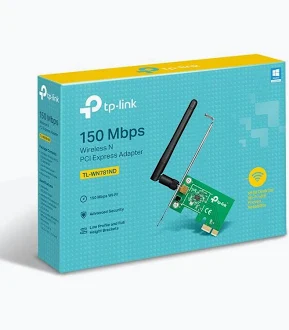
TP-Link 150Mbps Wireless N PCI Express Adapter – TL-WN781ND
KSh 1,799.00
- Up to 150 Mbps wireless transmission rate
- 2.4 GHz Wireless N connectivity
- PCI Express interface for compatible desktops
- Detachable 2 dBi omnidirectional antenna
- WPA/WPA2 wireless security support
TP-Link TL-WN781ND Adapter – 150Mbps Wireless N PCI Express Adapter
Upgrade your desktop’s wireless connectivity with the TP-Link TL-WN781ND adapter. This 150 Mbps Wireless N PCI Express adapter provides a convenient way to connect compatible desktop computers to Wi-Fi networks. It supports 2.4 GHz wireless networking and features a detachable external antenna for flexible positioning. Whether browsing the internet, sharing files, or streaming media, this adapter offers a practical solution for everyday connectivity. Its PCI Express interface fits standard compatible PCIe slots, making it suitable for desktop networking upgrades.
What It Is
The TP-Link TL-WN781ND is an internal wireless network card designed for desktop computers. It connects to a compatible PCI Express slot and enables wireless communication with a router or access point.
Unlike USB wireless adapters, this model installs inside the computer case. Its external antenna can be adjusted to suit the computer’s location and wireless environment. The antenna is detachable, offering additional flexibility when positioning or replacing it with a compatible antenna.
The adapter uses Wireless N technology, making it suitable for basic home and office networking. For model information, visit the official TP-Link product page.
Technical Specifications
- Brand: TP-Link
- Model: TL-WN781ND
- Product Type: Wireless N PCI Express Adapter
- Maximum Wireless Rate: Up to 150 Mbps
- Wireless Standards: IEEE 802.11b/g/n
- Frequency Band: 2.4 GHz
- Interface: PCI Express
- Antenna: One detachable omnidirectional antenna
- Antenna Gain: 2 dBi
- Wireless Modes: Ad-Hoc and Infrastructure
- Wireless Security: 64/128-bit WEP, WPA-PSK, and WPA2-PSK
- Dimensions: 120.8 × 78.5 × 21.5 mm
- Operating Temperature: 0°C to 40°C
- Operating Systems: Support varies by hardware revision and available drivers
- Typical Package Contents: Adapter, detachable antenna, resource CD, and quick installation guide; contents may vary by version or region
The 150 Mbps figure represents the maximum theoretical wireless link rate, not guaranteed internet speed. Actual performance depends on the router, signal strength, interference, and network conditions. Check the official TL-WN781ND support page for hardware-version details and available drivers.
TP-Link TL-WN781ND Adapter Benefits
Practical Wireless Networking
Connect a compatible desktop computer to an available Wi-Fi network without running an Ethernet cable directly to the router. This can help when the computer is located away from the network equipment or when a wired connection is inconvenient.
Wireless performance depends on distance, obstacles, and interference. Positioning the computer and antenna thoughtfully can help improve reception.
Detachable External Antenna
The external omnidirectional antenna can be rotated and adjusted to suit different installation environments. This provides flexibility when a desktop computer sits under a desk, beside a wall, or in another location with limited signal reception.
The detachable design also allows compatible antenna alternatives where appropriate. Review the manufacturer’s product details before selecting any replacement antenna.
PCI Express Installation
The PCI Express interface provides an internal networking option for desktop computers with a compatible expansion slot. The card supports standard PCIe slots, including x1 and larger compatible slots.
Installing an internal adapter can keep external USB ports available for other peripherals. Check the computer’s available slot, case clearance, and hardware revision before purchasing.
Everyday Wireless Security
The adapter supports legacy wireless security options, including WPA and WPA2 configurations. This helps it connect to compatible networks that use supported security settings.
Security also depends on the router and its configuration. For modern networks, use the strongest security mode supported by both the router and client device.
Product Use Cases
Home Desktop Computers
Add wireless connectivity to a compatible desktop used for browsing, email, online learning, and everyday internet access. This can be useful where running an Ethernet cable is impractical.
Small Offices and Workstations
Connect suitable office desktops to a wireless network for routine online tasks and access to network resources. Confirm the office’s wireless security and driver requirements before installation.
Basic Streaming and File Sharing
The adapter supports everyday wireless activities such as streaming media and sharing files across a network. Performance will depend on the available connection and the requirements of each application.
Desktop Repairs and Upgrades
Technicians can consider this adapter when restoring wireless connectivity to a compatible desktop. Verify the operating system and exact hardware version on the TP-Link download page before installing drivers.
Why Buy from Avidik Ventures
Avidik Ventures offers networking equipment and computing accessories for home, office, and business environments. We aim to provide clear product information to help customers select suitable technology for their needs. Choose the TP-Link TL-WN781ND for a straightforward internal Wi-Fi option for compatible desktop computers. Visit Avidik Ventures to explore networking products and accessories.











Reviews
There are no reviews yet.