
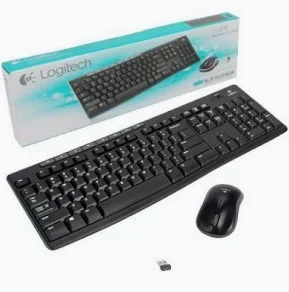
Logitech MK270 Wireless Keyboard and Mouse Combo – 920-004509
KSh 3,499.00
- Full-size wireless keyboard
- Integrated numeric keypad
- Eight dedicated media controls
- 2.4 GHz wireless connectivity
- Compact optical mouse
Logitech MK270 Wireless Combo — Logitech MK270 Wireless Keyboard and Mouse Combo – 920-004509
Logitech MK270 Wireless Combo delivers reliable wireless control for everyday computing. It combines a full-size keyboard with a compact wireless mouse. The keyboard includes a number pad and eight dedicated media controls. These features support typing, data entry, navigation, and daily office tasks. The compact mouse provides smooth optical tracking for accurate cursor movement. Both devices connect through a small USB receiver. The wireless design helps create a cleaner and more flexible workspace. This combination suits offices, homes, schools, reception desks, and shared workstations. Logitech identifies part number 920-004509 as a black US International keyboard configuration. Logitech MK270 official product information
Product Details
The Logitech MK270 is a wireless keyboard and mouse combination designed for practical everyday use. Its full-size keyboard provides a familiar typing layout with an integrated number pad. This makes it useful for documents, spreadsheets, administration, and numerical data entry.
The keyboard also provides eight dedicated media controls. These controls offer convenient access to music, volume, and other common media functions. The included mouse has a compact design and supports precise cursor control.
Both peripherals communicate wirelessly through a USB receiver. This removes the need for separate keyboard and mouse cables. It also gives users greater freedom when arranging their workstations.
Logitech MK270 product support and setup resources
Technical Specifications
The MK270 combines practical hardware with straightforward wireless connectivity. The following specifications are based on Logitech documentation for the MK270 family and the 920-004509 configuration.
- Product: Logitech MK270 Wireless Keyboard and Mouse Combo
- Part Number: 920-004509
- Colour: Black
- Keyboard Layout: US International
- Wireless Technology: 2.4 GHz wireless
- Receiver: USB Nano receiver
- Wireless Range: Up to 10 metres
- Keyboard: Full-size wireless keyboard
- Numeric Keypad: Integrated
- Media Controls: 8 dedicated controls
- Keyboard Battery: 2 × AAA batteries
- Keyboard Battery Life: Up to 36 months, depending on configuration
- Mouse: Compact wireless optical mouse
- Mouse Sensor: Logitech Advanced Optical Tracking
- Mouse Resolution: Approximately 1000 DPI
- Mouse Battery: 1 × AA battery
- Mouse Battery Life: Up to 12 or 18 months, depending on mouse configuration
- Mouse Scrolling: Vertical scrolling
- Connection: USB receiver
- Compatibility: Windows and ChromeOS, depending on configuration
Logitech documentation lists several MK270 configurations. Battery performance and receiver specifications can vary by included mouse and keyboard model. Logitech MK270 technical specifications
Logitech MK270 Wireless Combo for Office Productivity
The full-size keyboard is well suited to professional office environments. Its familiar layout supports fast typing and routine document preparation. The integrated number pad also benefits users working with numerical information.
Accountants, administrators, receptionists, and data-entry teams can use the numeric keypad for frequent calculations. The dedicated media controls also provide quick access to common audio functions.
The wireless connection helps reduce cable clutter around the workstation. This can make desks easier to organize and maintain. A single receiver also simplifies the initial connection process.
The keyboard uses an on/off switch and replaceable batteries. This makes it practical for workstations that require straightforward peripheral management.
Logitech wireless keyboard and mouse combinations
Logitech MK270 Wireless Combo for Comfortable Daily Use
The keyboard provides a full-size typing experience for users who prefer conventional layouts. Its number pad adds useful functionality without requiring a separate numeric keyboard.
The mouse complements the keyboard with a compact shape and optical tracking. Logitech describes the mouse as providing smooth cursor control across most surfaces. This makes it suitable for browsing, document editing, and routine office navigation.
The wireless design also allows users to position the keyboard and mouse comfortably. There is no keyboard cable crossing the desk or restricting placement.
The 2.4 GHz connection supports wireless operation within a range of up to 10 metres. Actual range can vary because of environmental and computing conditions.
Logitech MK270 wireless combo details
Logitech MK270 Wireless Combo for Home and Education
The combination is suitable for home computers, learning environments, and general-purpose workstations. Students can use the keyboard for assignments, research, presentations, and online learning.
Home users can also benefit from the full-size layout. The number pad is useful for calculations, forms, budgeting, and other numerical tasks. The mouse provides simple navigation for websites, applications, and documents.
Schools and institutions can deploy the combo across computer stations. Its wireless setup reduces the number of cables around each workstation. The simple design also makes it accessible to users with different levels of computer experience.
The MK270 supports compatible Windows and ChromeOS environments. Users should verify their specific operating system before deployment.
Logitech MK270 quick-start guide
Logitech MK270 Wireless Combo for Flexible Workstations
Wireless peripherals provide greater freedom when arranging desks and computer stations. The MK270 allows users to position the keyboard and mouse without direct cable connections.
This flexibility can benefit reception counters, training rooms, shared offices, and home workstations. Users can also move the peripherals when additional desk space is required.
The USB Nano receiver occupies minimal space around the computer’s USB port. Logitech documentation identifies the receiver as a 2.4 GHz wireless receiver for compatible MK270 configurations.
The keyboard and mouse use replaceable batteries. This avoids the need for charging cables and supports simple maintenance across multiple workstations.
Logitech MK270 setup documentation
Why It Stands Out
The MK270 stands out through its balance of full-size functionality and wireless convenience. The keyboard includes a number pad, dedicated media controls, and familiar full-size keys.
The compact mouse adds optical tracking for everyday navigation. Its small footprint also helps preserve valuable desk space.
The wireless receiver keeps the setup straightforward. Users can connect both peripherals without running separate keyboard and mouse cables across the workstation.
The combination is therefore well suited to users who need essential computer controls without complicated configuration. It focuses on practical productivity for everyday environments.
Why Buy from Avidik Ventures
Avidik Ventures supplies reliable computer accessories for offices, institutions, professionals, and home users. We focus on practical technology solutions from established brands. Our team can help you select suitable peripherals for your workstation requirements. Choose Avidik Ventures for dependable computer accessories and professional customer service. Contact us today to order the Logitech MK270 wireless keyboard and mouse combo.














Reviews
There are no reviews yet.