
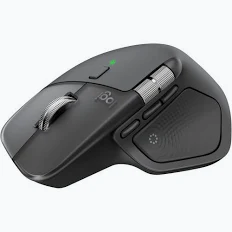
Logitech MX Master 4 Bluetooth Rechargeable Mouse – Graphite – 910-007562
KSh 16,000.00
- Customizable haptic feedback
- 8,000 DPI Darkfield precision sensor
- MagSpeed scrolling up to 1,000 lines per second
- Rechargeable battery lasting up to 70 days
- Bluetooth and Logi Bolt connectivity
Logitech MX Master 4 Bluetooth Rechargeable Mouse – Graphite – 910-007562
The Logitech MX Master 4 Bluetooth Rechargeable Mouse delivers immersive control, precision, and advanced productivity for demanding digital workflows. It combines an 8,000 DPI Darkfield sensor with customizable haptic feedback and powerful wireless connectivity. The ergonomic right-handed design supports extended computer use across professional environments. MagSpeed scrolling enables rapid navigation while maintaining excellent precision. The mouse also introduces Actions Ring shortcuts through Logi Options+, helping users access tools directly from the cursor. Its rechargeable battery provides up to 70 days of operation on a full charge.
Logitech MX Master 4 Professional Productivity
This high-performance wireless mouse is designed for professionals who demand greater control from their computing accessories. Its Graphite finish provides a refined appearance for contemporary office and workstation environments.
The mouse features eight controls, including dedicated navigation buttons, a gesture button, and an Actions Ring interface. Its thumb wheel supports horizontal scrolling across wide documents and timelines.
Customizable haptic feedback provides tactile confirmation for supported actions and notifications. Users can adjust supported functions through Logi Options+ for a more personalized workflow.
Logitech MX Master 4 Technical Specifications
- Product type: High-performance wireless mouse
- Model number: 910-007562
- Colour: Graphite
- Sensor technology: Darkfield high precision
- Nominal DPI: 1,000 DPI
- DPI range: 200–8,000 DPI
- DPI adjustment: 50 DPI increments
- Number of buttons: 8
- Scrolling technology: MagSpeed
- Horizontal scrolling: Supported
- Thumb wheel: Supported
- Gesture button: Supported
- Connectivity: Bluetooth Low Energy and Logi Bolt
- Wireless range: Up to 10 metres
- Battery: Rechargeable 650 mAh Li-Po
- Battery life: Up to 70 days
- Quick charging: One minute provides up to three hours
- Charging interface: USB-C
- Device switching: Up to three devices
- Dimensions: 128.2 × 88.4 × 50.8 mm
- Weight: 150 g
- Hand orientation: Right-handed
- Software: Logi Options+
- Supported platforms: Windows, macOS, Linux, ChromeOS, iPadOS, and Android
The mouse supports both Bluetooth Low Energy and compatible Logi Bolt receivers. Official Logitech specifications
Logitech MX Master 4 Precision and Tracking
The Darkfield high-precision sensor provides responsive cursor movement from 200 to 8,000 DPI. Users can adjust sensitivity in 50 DPI increments for different applications and display sizes.
This sensor tracks across virtually any surface, including suitable glass surfaces. That capability makes the mouse practical for professionals using different desks and workstations.
High DPI settings support large displays and fast cursor movement with minimal hand travel. Lower settings provide greater control for detailed design and precision-oriented tasks.
The MagSpeed electromagnetic scroll wheel delivers smooth and accurate navigation through lengthy documents. It can scroll through up to 1,000 lines per second in hyper-fast mode. Logitech MX Master 4 product information
Logitech MX Master 4 Haptic Feedback
Haptic feedback gives supported actions a physical response that users can feel. This feature can provide tactile confirmation for selected shortcuts, notifications, and workflow actions.
The Actions Ring creates a customizable digital control area around the cursor. It provides quick access to frequently used tools, shortcuts, filters, and functions.
Through Logi Options+, users can customize supported controls for different applications. Creative professionals can configure workflows around editing tools, while office users can assign repetitive productivity commands.
This approach reduces unnecessary cursor movement during complex workflows. It can be particularly useful when applications contain numerous menus, panels, and frequently accessed controls.
Logitech MX Master 4 Multi-Device Connectivity
The mouse supports connection with up to three compatible devices. Users can move between computers using the Easy-Switch button or supported Actions Ring functionality.
Bluetooth Low Energy provides convenient wireless connectivity without requiring a receiver. Logi Bolt provides another connection option for compatible computers and professional setups.
Wireless operation extends up to 10 metres under suitable conditions. This flexibility supports offices, conference rooms, home workstations, and multi-computer environments. Logitech support resources
Logitech MX Master 4 Professional Use Cases
This mouse is suited to graphic designers, developers, analysts, architects, editors, consultants, and business professionals. Its precision sensor supports detailed cursor positioning across demanding applications.
Designers can benefit from adjustable DPI and customizable controls during image editing and layout work. Video editors can use the thumb wheel for horizontal timeline navigation.
Developers can configure buttons for repetitive commands and application shortcuts. Analysts can navigate extensive spreadsheets and dashboards using the MagSpeed wheel.
Office professionals can use multi-device connectivity when working between laptops and desktop computers. Remote workers can also benefit from quiet clicking and ergonomic support during extended sessions.
Why Logitech MX Master 4 Stands Out
The combination of haptic feedback, Actions Ring controls, precision tracking, and advanced scrolling makes this mouse highly capable. Its ergonomic construction supports right-handed users during extended working sessions.
The 650 mAh rechargeable battery can provide up to 70 days of use. A one-minute quick charge can provide up to three hours of operation.
QuietClick technology also reduces click noise by approximately 90% compared with the MX Master 3. This makes the mouse suitable for open offices and shared workspaces.
Why Buy from Avidik Ventures
Avidik Ventures supplies professional technology products for modern business and productivity environments. We focus on dependable solutions from established technology manufacturers. Our product range supports efficient computing, communication, and digital workflows. The Logitech MX Master 4 suits professionals seeking advanced control and comfortable everyday operation. Choose Avidik Ventures for reliable technology solutions and professional product support.












Reviews
There are no reviews yet.